Parameters and formulas
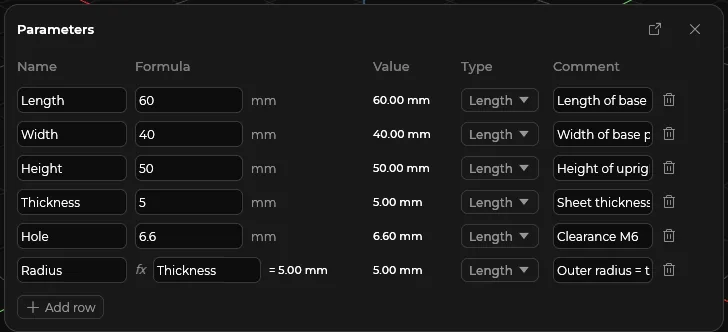
Parameters give dimensions a name, for example Width or Wall. If you change the parameter, all dimensions that use it change too.
Creating a parameter
- Choose "Edit" → "Parameters …".
- Click "Add row". A new row appears with the name "Parameter1" and the value 10. It scrolls fully into view.
- Enter a name, for example
Width. - Under "Formula", enter a value or a formula, for example
60. - Choose the "Type": "Length" (mm or in, depending on the setting), "Angle" (degrees) or "Number" (no unit).
- Add a "Comment" if you like.
The "Value" column shows the result.
Note
The window cannot be opened while a sketch is open. Finish the sketch first.
Using parameters
In many number fields you can enter a formula instead of a number:
- sizes and positions of box, cylinder, sphere and cone,
- the height when extruding,
- Δx, Δy and Δz when moving,
- radius, distances and angles of fillets and chamfers (not with a variable radius),
- position and scale of imported mesh bodies,
- dimensions in sketches and the fields at the pointer while drawing,
- the height of a text in a sketch.
Example: enter Width / 2 as the height. The field then shows "fx" and the result next to it, for example "= 30".
Clicking "fx" replaces the formula with its current value.
What formulas may contain
| What | Example |
|---|---|
| Operators + − * / | Width - 2 * Wall |
| Power ^ | 2 ^ 3 |
| Parentheses | (Width + 10) / 2 |
| Square root | sqrt(16) |
| sin, cos, tan (in degrees) | sin(30) |
| Absolute value, minimum, maximum, rounding | abs(x), min(a; b), max(a; b), round(x) |
| Pi | pi |
- You can use a comma or a point as the decimal separator:
2,5or2.5. - Separate several values in a function with a semicolon
;or with a comma and a space,. - Without a unit, the unit from the settings applies (millimeters or inches). You can also write
mm,cm,morinafter a number, for exampleWidth + 1 in. See Settings and updates.
Changing, renaming, deleting parameters
- Change the value: change the formula. All dimensions that use the parameter are recalculated.
- Rename: change the name. All formulas are adjusted automatically.
- Delete: select the row and click "Delete row". A parameter that is still in use cannot be deleted. The program then names the places, for example "Width is used in Box 1, Sketch 2." If a parameter is only used in a sketch text as
{Name}, the program asks first. You can then replace it with its value;{Name}stays in the text literally. - "Replace with value": replaces a formula with its number.
Limits
- At most 500 parameters per document.
- Parameters only apply within their own document.
- Formulas do not work in dimensions of the technical drawing.
- There are no text parameters and no if-then conditions.